Strategy guide
Rules of Engagement: Getting Your Collections Ready for Autonomous AI
Last updated: · 9 min
Lire en françaisA collection approach tells Finaxis when to write to a customer, in what tone, through which channel and when to stop. The Manage your collection approaches guide explains how to set up an approach, screen by screen. This guide answers another question: why create more than one?
The answer fits in one idea. An approach is the rules of engagement you give the AI. By default, a person approves every reminder. Tomorrow, an AI will be able to send on its own the reminders that follow your rules. Your approaches are where you decide, group by group, how far it may go.
Quick Answer: Rules of Engagement
- An approach: the rules of engagement for a group of customers. When to write, in what tone, through which channel and when to stop.
- By default, in copilot: every reminder waits for your approval in To approve.
- Autopilot: locked by default, it is unlocked upon your request, or when Finaxis offers it after a few months of use. The choice approach by approach is planned.
- The structure that works: two to four global approaches, then exceptions customer by customer.
- Your strategic accounts: an approach of their own, highly personalized, that can stay in copilot.
- To go further: your own agents, such as OpenClaw, Hermes Agent or Claude Code, connected to the Finaxis MCP server.
Copilot or autopilot
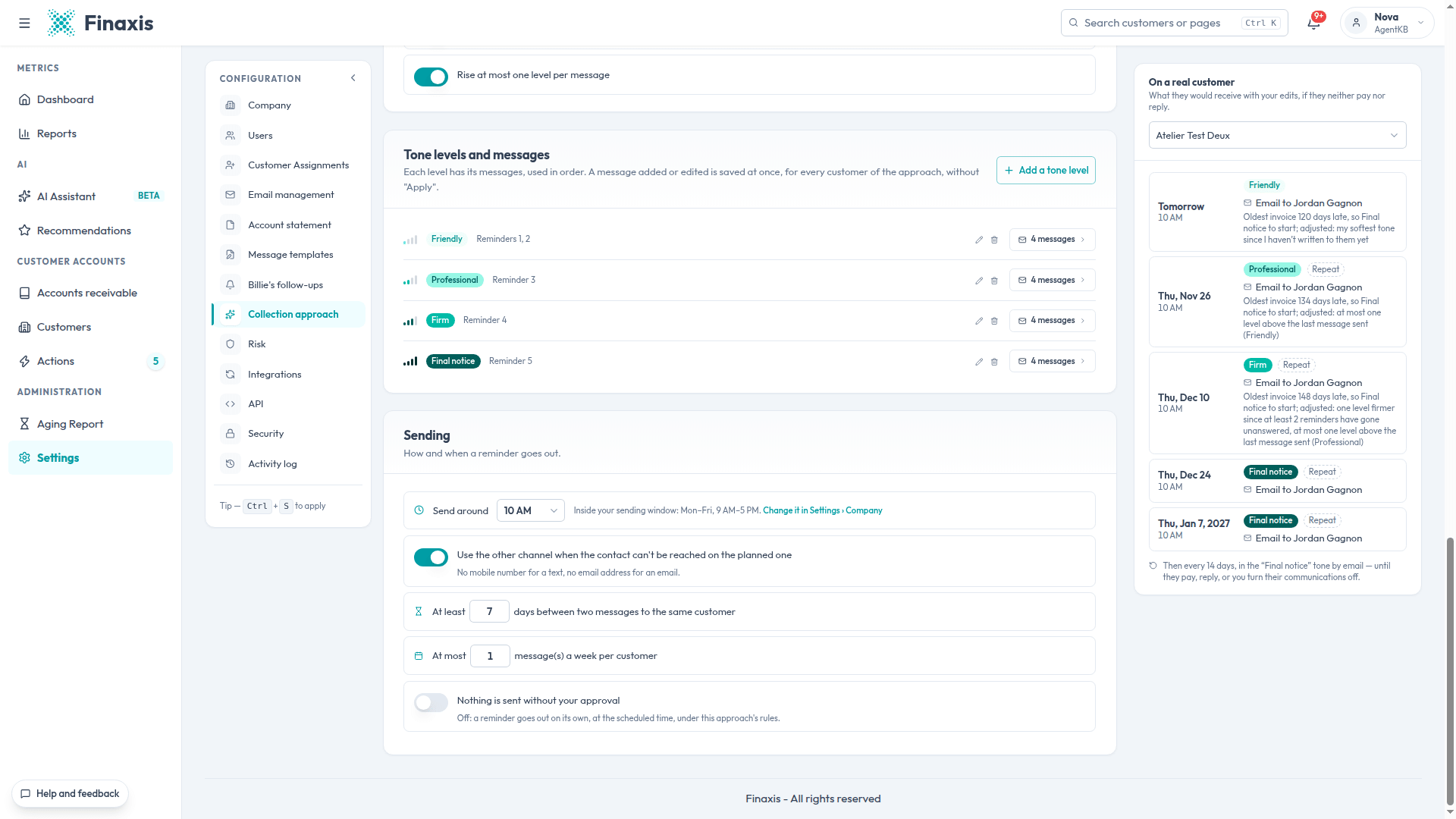
Finaxis prepares every reminder from the customer's approach. What happens next depends on a single setting: Nothing is sent without your approval, in the approach's Sending section.
| Mode | What happens | For whom |
|---|---|---|
| Copilot | Finaxis prepares the draft the day before. A person reads it, edits it if needed and approves it. Nothing goes out without them. | Every portal, by default. Your strategic accounts, for as long as you want. |
| Autopilot | Finaxis sends on its own, at the scheduled time, the reminders the approach's rules produce. | The groups of customers whose rules have proven themselves in copilot. |
Today
By default, automatic sending is turned off and locked for the whole account. Every reminder waits in Actions › To approve, and none goes out until a person approves it. The lock is lifted only upon your request. Finaxis also offers it after a few months of use.
The philosophy: building trust. As long as the lock is in place, no reminder can go out without your approval: you keep 100% control over what happens. Trust grows with use. You review the emails, you see their quality week after week, then you are ready to say: for these reminders, I know the job will be done well. You can then hand the AI the reminders of that group, then the follow-ups their replies call for.
What is planned
This setting is planned to become a box you uncheck in each approach. You will then be able to put one approach on autopilot and keep another in copilot.
In short. Today: every reminder goes through a person. Upon your request, or when Finaxis offers it after a few months: automatic sending. Planned: the choice approach by approach. The approaches you build today are the ones that will decide tomorrow what the AI does on its own.
Why several approaches
An AI that acts on its own needs clear limits. A single approach for all your customers forces you to choose between two bad options: caution everywhere, or autonomy everywhere, even with your best customers.
Several approaches solve this. Each one is a sandbox: a group of customers, written rules and a clear limit on what the AI does on its own. Where you are comfortable, the AI can move fast. Where the relationship matters too much, a person stays in charge.
The structure that works: two to four approaches, then exceptions
One approach per customer soon becomes unmanageable. A single approach for everyone lacks nuance once your customers form distinct groups. Then, the right balance looks like this:
- Two to four global approaches, one per large group of similar customers: a line of business, a type of customer, a range of balances.
- Exceptions customer by customer, on top of one of those approaches: a different delay, a softer tone, a person in copy, messages written for that customer. See Make an exception for one customer.
- A separate approach for your strategic accounts: your five key customers, your 10 largest accounts, the delicate relationships.
You need no outside tool for any of this. Approaches, exceptions and the Orchestration page are already in Finaxis.
Ways to split your customers
| Split | Sample approaches | Target mode, once the rules are proven |
|---|---|---|
| By line of business | Distribution, After-sales service, Rentals | Autopilot for lines with small recurring invoices, copilot for the others |
| By account size | Small balances, Regular accounts, Key accounts | Autopilot for small balances, copilot for key accounts |
| By type of customer | Businesses, Public bodies, Individuals | Depending on your confidence in each group |
| By relationship | Strategic accounts | Copilot |
Finaxis does not assign a customer to an approach from its balance or line of business: you do the sorting. Two simple ways:
- Export your customer list, keep the customers of the group, then import the file in Assign customers › Import a CSV.
- If your customers come from more than one integration, choose on each integration's page the approach its new customers follow, with the New customers follow list.
The steps are in Assign customers to an approach.
Write solid rules of engagement
An approach is more than a schedule. Its settings are the guardrails Finaxis applies to every customer of the group, whether a person approves the reminder or not. Before you hand a group to autopilot, check them one by one:
| Guardrail | Where to set it | What it protects |
|---|---|---|
| Do not write to a customer waiting for your reply | I hold off when… | The ongoing conversation. Keep it on. |
| Wait for the date of a payment arrangement or a postdated cheque | I hold off when… | The customer's word. |
| Do not chase below a minimum balance | I hold off when… | Your time and the customer's, for a few dollars. |
| Rise at most one level per message | I adapt the tone | The tone never jumps two steps at once. |
| A minimum gap between two messages and a weekly cap | Sending | The customer never gets a flood of messages. |
| The sending window | Settings › Company | The days and hours when a reminder may go out. |
Your strategic accounts: an approach of their own
Your five strategic customers, your 10 largest accounts, a customer with a delicate relationship: this is where a misplaced reminder costs the most. Give them an approach of their own, for example "Strategic accounts", and personalize it:
- Reminders further apart, by email only, with the account statement attached.
- Messages written for each customer, in the tone of the relationship, with Write messages for one customer.
- The right person in copy, such as the account representative, with Choose who to write to.
- Copilot: every reminder goes through a person before it leaves. Once the choice is possible approach by approach, this is the one you keep under approval.
Start in copilot, then widen
Autopilot is earned. Run each approach in copilot first, and watch what it produces:
- Create your approaches and assign your customers to them. Start from a copy of the default approach.
- Approve in copilot for a few weeks. Every draft you edit or reject points to a rule to fix.
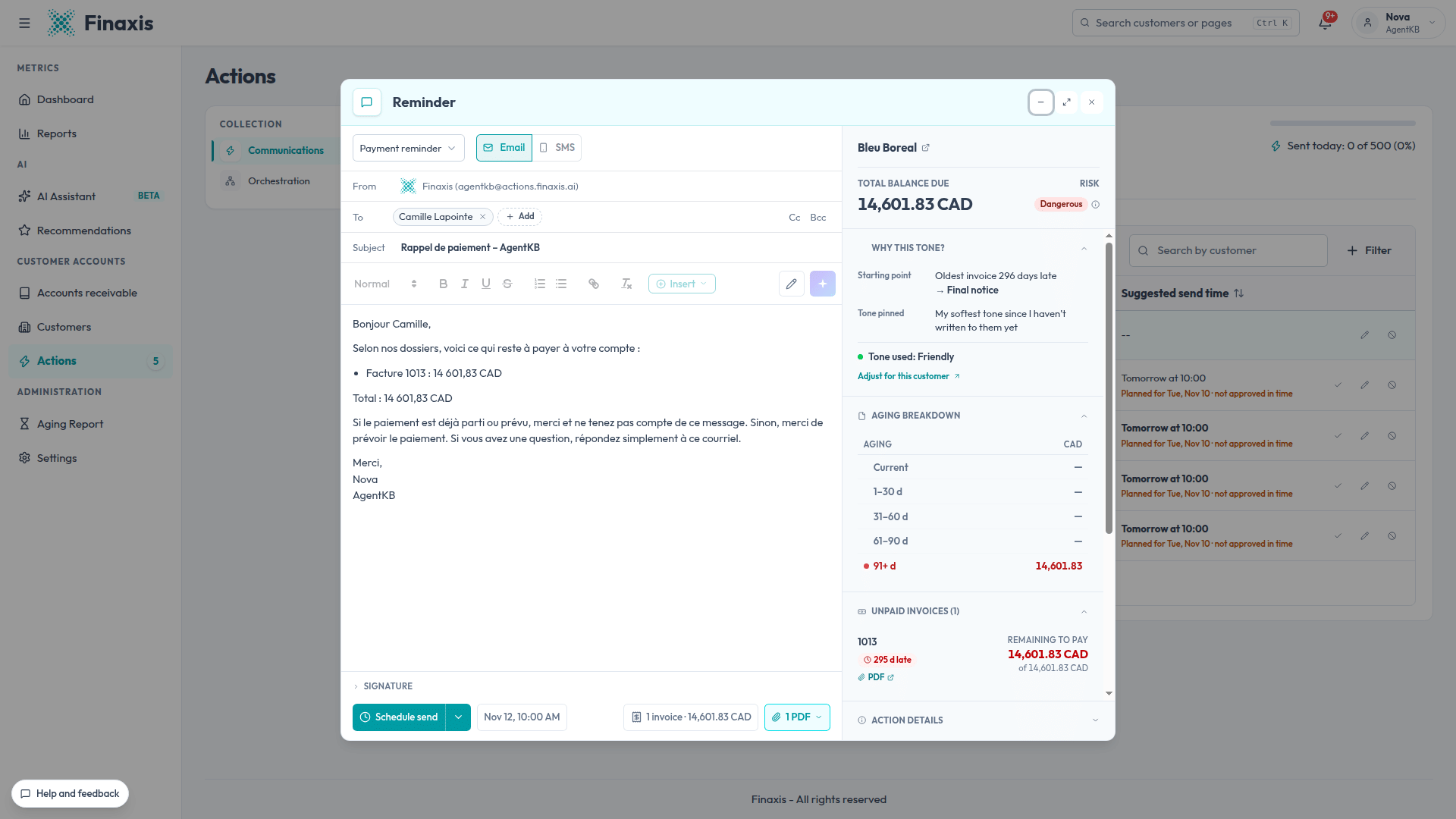
- Read the Why this tone? box in every draft. A tone that surprises you shows a setting to review. See Understand why a reminder has its tone.
- Check Orchestration. For each customer, it says what goes out next, and why. See Follow every customer in Orchestration.
- Fix the approach, not the draft. A fixed draft settles one customer. A fixed rule settles the whole group.
- Widen one group at a time. The day you approve almost everything without changing a word, the approach is ready. Start with the least sensitive group, such as small balances.
What stays human
Even on autopilot, keep these decisions in a person's hands:
- Answering a customer who writes, until you hand those follow-ups to the AI. Until then, with the hold made for this case, their reminders wait for your reply.
- Negotiating a payment arrangement, then recording it so reminders respect it.
- Deciding the approaches, their rules and who follows them. Creating and editing an approach is reserved for the portal's administrators.
- Handling disputes and delicate cases, through an exception or by turning off a customer's communications.
Go further: your own orchestration agents
If your team already uses an AI agent, such as OpenClaw, Hermes Agent or Claude Code, you can connect it to Finaxis through its MCP server, with the scopes you approve. It then works alongside your approaches:
- Rank your customers to decide who follows which approach. In our Hermes Agent guide, the agent ranks every customer A, B or C. Ask it for the result as a CSV file, one row per customer, then import it in Assign customers.
- Prepare the morning brief: overdue balances, priority calls, upcoming payment arrangements. See our OpenClaw guide.
- Act in Finaxis with the write scopes: add a note, record a payment arrangement, pause or resume a customer's reminders, prepare a reminder draft.
What an agent writes in Finaxis is identified in the activity log. To choose between a person's access and a service account, read Choose how an AI agent connects to Finaxis.
Frequently Asked Questions
Does the AI send reminders without me today?
Not by default. Automatic sending is locked for the whole account: every reminder waits for your approval in To approve. The lock is lifted only upon your request, or when Finaxis offers it after a few months of use.
How many approaches should I create?
Once your customers form distinct groups, two to four global approaches are usually enough, with exceptions for the customers who need special treatment. A small portfolio can do very well with a single approach and a few exceptions.
Do I need an approach for each important customer?
No. Create one approach for the group, for example "Strategic accounts", then personalize each customer with exceptions and messages written for them.
Can Finaxis assign a customer to an approach from its balance?
No, you choose. Export your customer list, sort it, then import the file in Assign customers. A new customer follows the default approach, or the one you chose for its integration.
Do I need OpenClaw or another AI agent?
No. Approaches, exceptions and Orchestration are in Finaxis. An agent connected to the MCP server is useful if your team already uses one, for example to rank your customers or prepare a brief.
What happens when a customer replies to a reminder?
With the hold made for this case, their reminders wait until you handle the reply. Keep this hold on in every approach, especially those on autopilot.