Connect OpenClaw to Finaxis
OpenClaw is an open-source personal AI agent that runs on your machine or server and answers you in chat apps. Connected to Finaxis through its MCP server, it reads your customers, invoices, payments and aging, prepares your collections work and can run it on a schedule, never beyond the rights of the access you give it.
Before you start
- OpenClaw installed, with a model connected and its Gateway running. These steps were tested with OpenClaw 2026.11.
- To choose between your own access and a service account, read Choose how an AI agent connects to Finaxis.
Connect with your own access
- In a terminal where OpenClaw runs, declare the Finaxis MCP server with OAuth.
openclaw mcp set finaxis '{"url":"https://api.finaxis.ai/mcp","transport":"streamable-http","auth":"oauth"}'- Start the connection. OpenClaw prints the address to open in your browser.
openclaw mcp login finaxisOpenClaw waits for your browser to come back to it. If OpenClaw runs on another machine and the return page cannot load, cancel, copy the code from the address bar and run openclaw mcp login finaxis --code followed by that code.
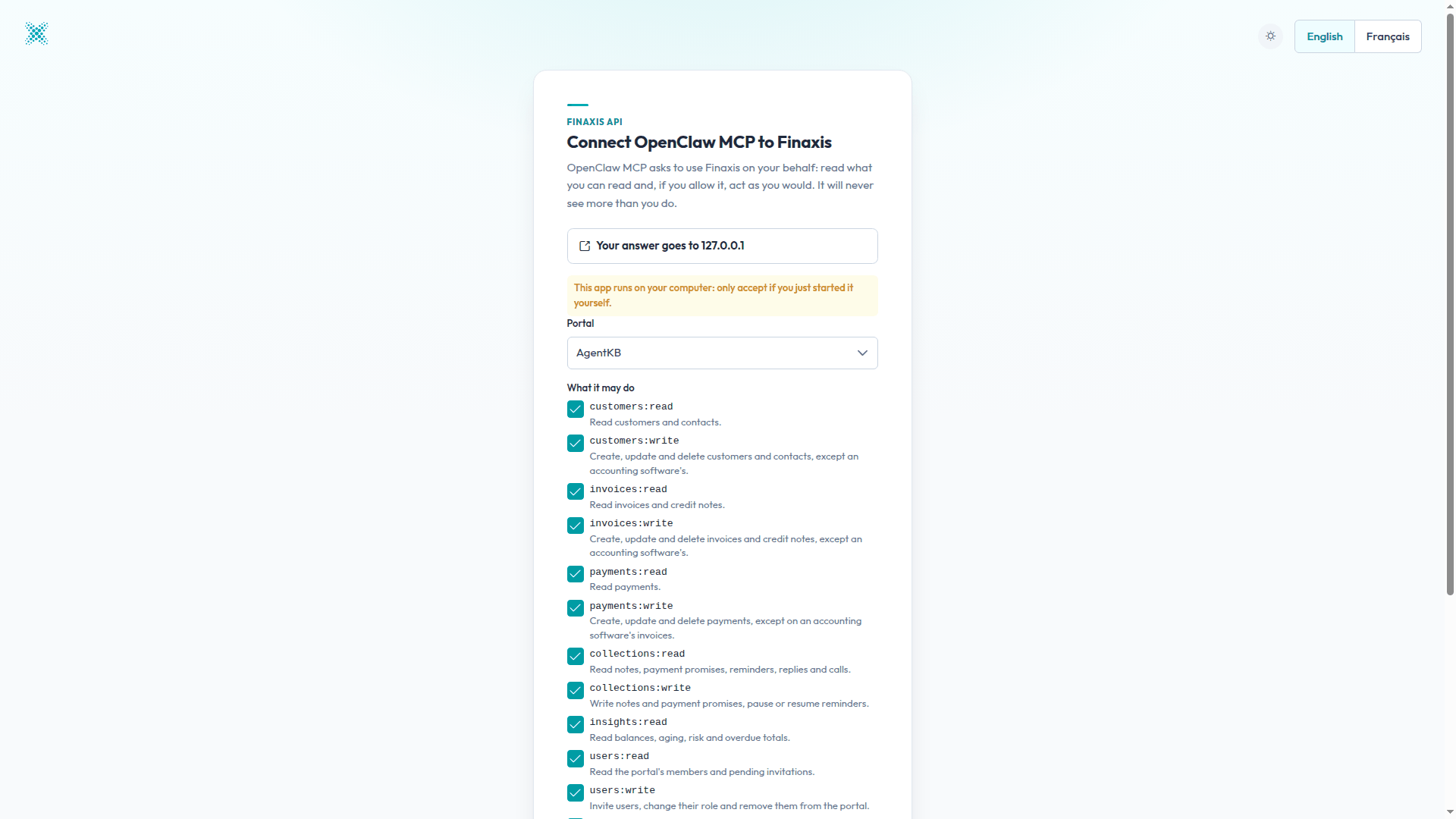
- If Finaxis asks you to log in, log in as usual. A page named Connect OpenClaw MCP to Finaxis opens.
- Under Portal, choose the instance the agent will work in. A connection works on one instance only.
- Under What it may do, uncheck the scopes the agent should not have, for example every write scope to start. The agent never goes beyond your rights, whatever you check.
- Click Connect, then go back to your terminal.
- Check that OpenClaw sees the Finaxis tools: eight with the read scopes alone.
openclaw mcp probe finaxisThen ask your agent, in a chat or from the terminal, for example: Which customers are the most overdue in Finaxis, and for how much?
openclaw agent --message "Which customers are the most overdue in Finaxis, and for how much?"Please note: OpenClaw registers itself with Finaxis, so the page shows OpenClaw MCP without a published identity, and the connection lists Answers to 127.0.0.1. Approve it only if you just started it yourself.
Schedule a job
OpenClaw runs tasks on a schedule. This one prepares a collections brief every weekday at 8 a.m. and changes nothing in Finaxis.
openclaw cron add --name "Morning collections brief" --cron "0 8 * * 1-5" --tz America/Toronto --no-deliver \
  --message "With the finaxis MCP server, list the customers 91 days and over with their balance and last collection action, then a prioritized list of 3 calls. Read only."
Each run is kept in the history of the job: openclaw cron runs followed by its id shows what the agent wrote. openclaw cron run starts it right away to test it.
Please note: By default, OpenClaw also wakes your agent every 30 minutes (its heartbeat). If the agent should act only on request or on schedule, turn it off with openclaw config set agents.defaults.heartbeat.every 0m.
Use a service account
For an agent that serves several people in a shared channel, or runs alone on a server, a service account keeps its access separate from any member. OpenClaw sends its token in a header.
openclaw mcp set finaxis_sa '{"url":"https://api.finaxis.ai/mcp","transport":"streamable-http","headers":{"Authorization":"Bearer ${FINAXIS_TOKEN}"}}'OpenClaw reads FINAXIS_TOKEN from the environment of the Gateway when it starts. The token of a service account lasts one hour: restart the Gateway with a fresh token for each period of work, or connect with your own access, which OpenClaw renews by itself.
Please note: In a shared channel, one connection gives everyone who writes to the agent the rights of that connection. Use a service account limited to what the whole channel may see.
Troubleshooting
| Situation | What to do |
|---|---|
| openclaw mcp login says the state is owned by a Gateway | Another OpenClaw command or the Gateway is holding its settings. Let it finish, or run the login through the Gateway. |
| The return page cannot load after you click Connect | Copy the code from the address bar and run openclaw mcp login finaxis --code with it. |
| finaxis_sa answers 401 | The Gateway started without FINAXIS_TOKEN, or the token is more than an hour old. Restart the Gateway with a fresh token. |
| A tool you expected is missing | The scopes you approved hide it. Edit the connection in Finaxis, or connect again and check the scope. |
Need help connecting your agent? Write to support@finaxis.ai with the request id from the request log, and our team will help you.
Related articles
Can't find what you're looking for?
Our support team is here to help.