Understand what data the AI uses
Last updated on
Applies to: All plans
Lire en français
Finaxis writes reminders and analyses that mention the right invoices, the right history, and the right context. To do that, it first builds a profile of the customer from the data you already have in the platform. This article explains what goes into that profile, and how to make it better.
The five sources of the customer profile
| Source | What the AI reads |
|---|---|
| Invoices | Outstanding balance, paid and unpaid counts, overdue invoices from the oldest, invoices not yet due, and the most recent payments. |
| Internal notes | The notes your team writes on the customer, including the case summaries from your recommendations. |
| History of exchanges | The date, the direction, the channel, and the subject of the messages exchanged. The content of the messages is not read. |
| Connected CRM | Open deals, recently closed deals, recent activities, and notes from your CRM, when one is connected. |
| Public news | A short search on the company name, to spot public signals such as an acquisition or financial difficulties. |
Please note: When a source has nothing to offer, it is simply skipped, and the profile notes what was unavailable. The AI therefore never fills a gap with an assumption.
When the profile is built
- The profile is built the first time it is needed, when you rewrite a message with AI or open the detailed analysis of a customer.
- It is then reused for about an hour, which is why the second request on the same customer is much faster.
- Customers you never work on never trigger any of this.
- The profile itself is not a page you can open. It is the material the AI features work from.
How fresh the picture is
- Editing an internal note, recording a payment by hand, or sending a reminder clears the profile right away. The next AI request rebuilds it.
- After an accounting synchronization brings in new invoices, allow up to an hour before the AI reflects them.
- CRM data follows the pace of your CRM synchronization.
- The public news check is redone every time the profile is rebuilt.
Improve what the AI knows
Internal notes are your direct channel into the profile. What you write there shapes the messages and the analyses that follow.
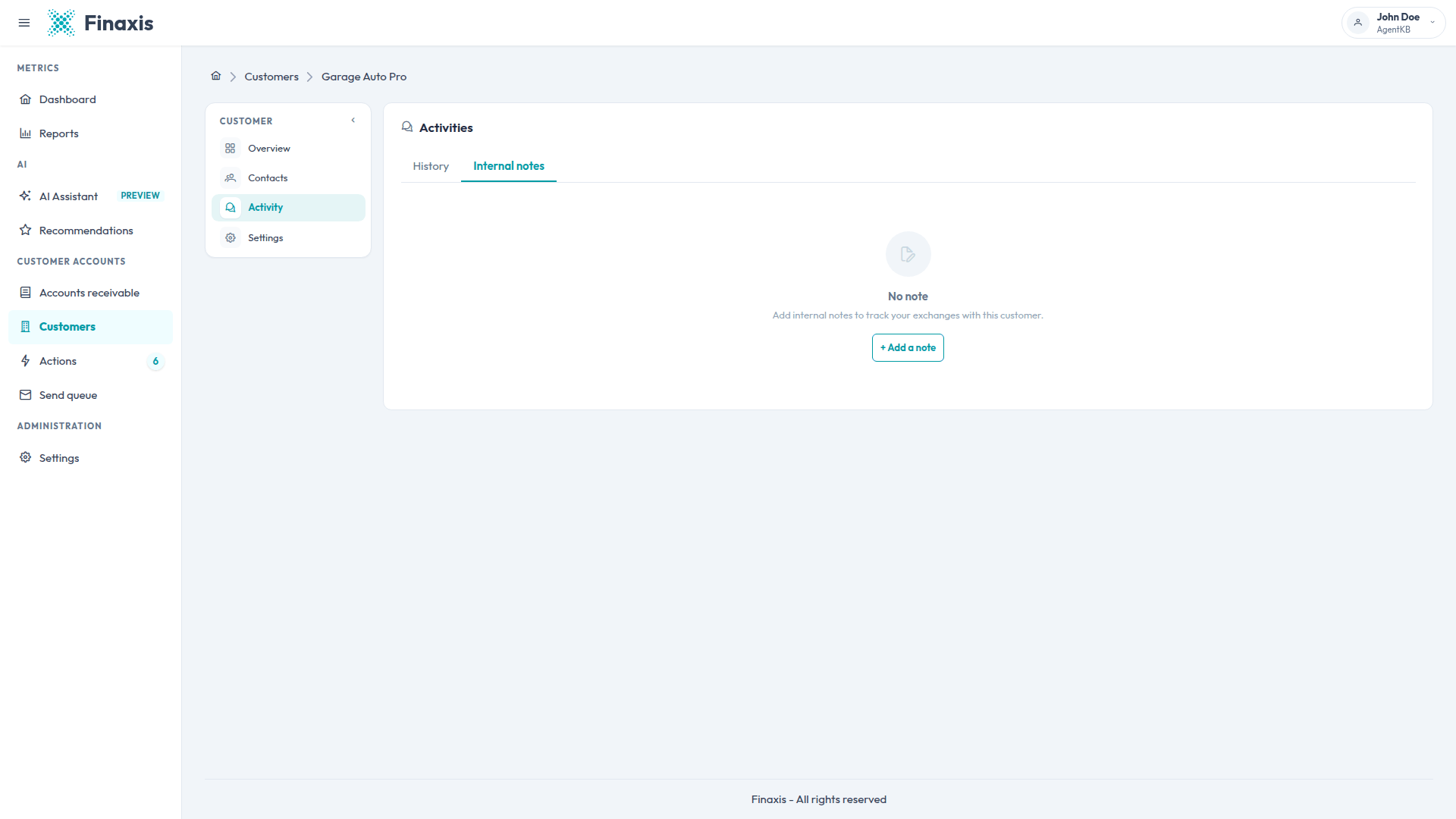
- Open the customer, then the Activity tab.
- Click Internal notes, then Add a note.
- Write the context worth remembering: an agreed payment plan, a disputed invoice, a change of contact, a seasonal cash flow.
- Save. The next reminder or analysis for this customer takes your note into account.
- The phone call notes and case summaries you write on the Recommendations page land in the same place.
- Keep the customer contacts and their language up to date: messages are written in the contact's language.
- When a CRM is connected, you choose which of its fields feed the AI.
Privacy of your data
- The AI only reads the data of the Finaxis account you are working in.
- The customer profile and the analyses are stored encrypted, because they quote your financial figures.
- Your conversations with the assistant stay private to your user account.
- The AI never sends anything to a customer. Every message waits for your approval.
Questions about the data behind the AI? Write to support@finaxis.ai and our team will help you.
Related articles
Can't find what you're looking for?
Our support team is here to help.